A chatbot can look perfect in a demo.
It answers a few questions quickly. The interface looks modern. The AI sounds natural. Everyone in the meeting thinks, “This could save us a lot of time.”
Then real users arrive.
They ask questions the team never anticipated. They misspell words. They change their minds halfway through a conversation. They ask for something the chatbot cannot do. They want to speak to a person. And suddenly, the impressive demo starts feeling like a frustrating customer-service maze.
This is one of the biggest lessons in AI chatbot development: a chatbot that can talk is not necessarily a chatbot that can help.
Successful chatbot projects require much more than choosing a powerful AI model. Businesses need a clear purpose, reliable information, thoughtful conversation design, useful integrations, security controls, human escalation, realistic testing, and continuous improvement.
The good news is that most chatbot failures are avoidable.
Here are the common chatbot development mistakes businesses should watch for before and after launch.
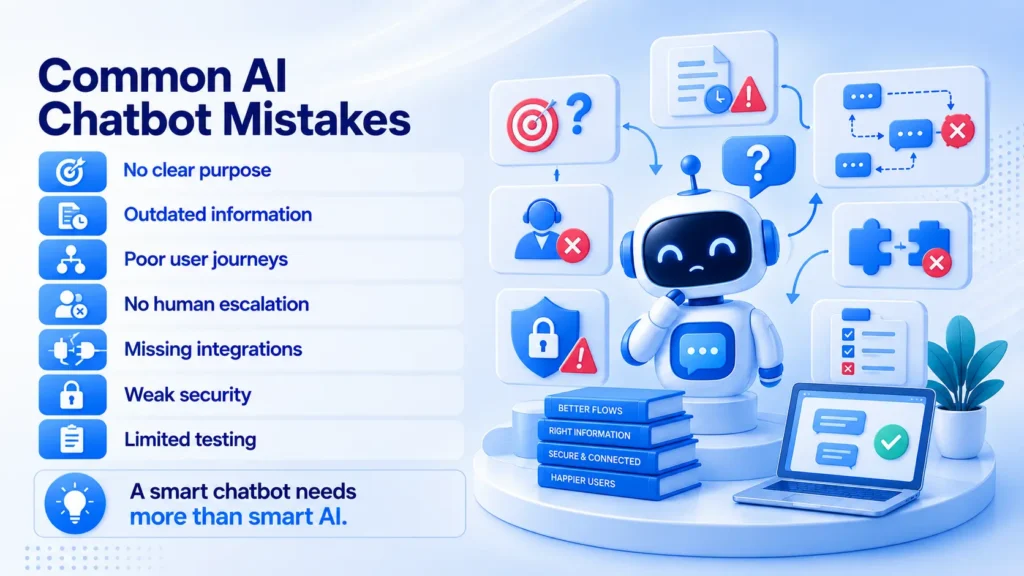
Mistake 1: Building a Chatbot Without a Clear Purpose
The first mistake is starting with the technology instead of the problem.
A business may decide it needs an AI chatbot simply because competitors are using one. But “we need a chatbot” is not a business objective.
The real objective might be reducing support tickets, helping customers find products, qualifying leads, assisting employees, or guiding users through a specific process.
Without that clarity, the chatbot becomes a general-purpose tool with no clear definition of success.
How to avoid it: Define the audience, use cases, expected outcomes, and success metrics before development starts. A focused chatbot with a measurable purpose will usually outperform a broader chatbot that tries to serve everyone.
Mistake 2: Designing the Bot Around Questions Instead of User Journeys
Businesses often create a list of FAQs and assume that is enough.
But customers do not always arrive with perfectly formed questions. They arrive with goals.
Someone may say, “I need to return this,” when what they really need is to check eligibility, find the policy, generate a return request, and understand what happens next.
A chatbot should therefore be designed around journeys, not just questions.
How to avoid it: Map the common paths users take. Define the starting point, information needed, actions available, possible outcomes, and escalation points. This creates conversations that feel useful rather than like a searchable FAQ page.
Mistake 3: Feeding the Chatbot Poor or Outdated Information
Even a powerful AI model cannot compensate for unreliable business information.
If the chatbot uses outdated policies, incomplete documentation, contradictory FAQs, or old product details, it can provide answers that sound convincing but are wrong.
That can damage trust faster than not having a chatbot at all.
How to avoid it: Create a controlled source of truth. Review the information before connecting it to the chatbot, assign ownership for updates, remove outdated content, and establish a process for keeping important information current.
In other words, knowledge management is part of chatbot development, not a task to leave until after launch.
Mistake 4: Expecting AI to Handle Everything
Automation can be tempting.
If a chatbot can answer one type of question, why not let it handle every customer interaction?
Because some situations require judgment, empathy, negotiation, or expertise. A frustrated customer may need a person. A complex technical problem may require investigation. A sensitive issue may be inappropriate for automated handling.
Trying to force every conversation through AI often creates a worse experience.
How to avoid it: Define the chatbot’s boundaries. Let AI handle appropriate routine interactions and create clear paths to human support for complex, sensitive, urgent, or unsupported requests.
Mistake 5: Building a Chatbot That Cannot Take Action
A chatbot can explain how to do something without actually helping the user do it.
That distinction matters.
If a customer asks to check an order, update information, create a support request, schedule a service, or retrieve a document, sending them to another page may simply move the problem somewhere else.
How to avoid it: Integrate the chatbot with relevant business systems where appropriate. CRM platforms, ticketing systems, databases, knowledge bases, scheduling tools, and internal applications can turn a conversational interface into an actual workflow.
The goal is not just better answers. It is fewer steps between the user’s question and the outcome.
Mistake 6: Treating Security and Privacy as a Final Checklist
Chatbots can interact with customer information, internal documents, business systems, and automated actions.
That creates security considerations from day one.
Risks can include excessive permissions, unauthorized data access, insecure integrations, prompt manipulation, accidental exposure of internal information, and poorly controlled actions.
How to avoid it: Build security into the architecture. Use appropriate authentication and authorization, minimize access, protect sensitive data, validate actions, monitor important events, and test the chatbot against realistic misuse scenarios.
The more powerful the chatbot becomes, the more important these controls become.
Mistake 7: Testing Only the Happy Path
A chatbot can pass every planned test and still fail with real users.
Why? Because real conversations are messy.
Users misspell words, combine multiple requests, use slang, change topics, provide incomplete information, and ask questions nobody included in the original test plan.
How to avoid it: Test normal conversations and edge cases. Include ambiguous questions, unexpected inputs, unsupported requests, adversarial prompts, escalation scenarios, and integration failures.
Testing should continue after launch. Real conversations will reveal failure patterns that no initial test plan can predict.
Mistake 8: Launching the Chatbot and Never Improving It
A chatbot is not a one-time software feature.
After launch, customers will reveal new questions. Products and policies will change. New integrations will become available. Some responses will work better than others.
A chatbot that is never reviewed will gradually become less useful.
How to avoid it: Create an ongoing optimization process. Review conversations, identify unanswered questions, update knowledge, refine workflows, monitor performance, and improve the system based on real evidence.
The launch is the beginning of the chatbot’s learning and optimization cycle, not the end of development.
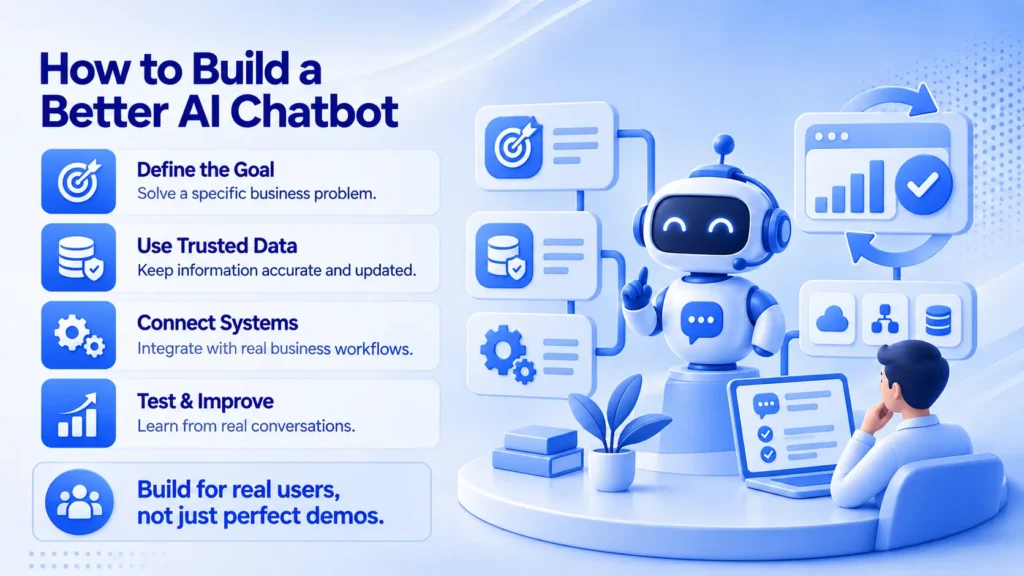
How Prismberry Helps Businesses Build Better AI Chatbots
Good chatbot development is not just about choosing an AI model. It is about building the right solution around the user’s needs, business information, workflows, and systems.
Prismberry can help businesses with:
- AI chatbots and virtual assistants
- Knowledge-based AI and retrieval systems
- Workflow automation and business integrations
- CRM, ticketing, and enterprise-system integration
- Custom AI applications for specific business requirements
Where AgentIQ Fits
Prismberry’s AgentIQ provides an enterprise AI agent layer that can work with approved business knowledge and connected systems.
This can help businesses avoid some of the common chatbot problems discussed above by giving AI access to relevant context instead of relying only on generic responses.
For example, AgentIQ can work with:
- Internal knowledge bases and documents
- CRM and customer information
- Ticketing and support systems
- Business databases and APIs
- Internal tools and enterprise applications
The focus is simple: build a chatbot that is useful in the real workflow, knows what information it can use, and has clear boundaries when a human needs to step in.
Final Thoughts: The Best Chatbot Is Not the One That Says the Most
Most chatbot problems do not begin with a lack of AI capability.
They begin with unclear goals, weak information, poor conversation design, missing integrations, inadequate testing, or the assumption that automation should replace every human interaction.
Avoid those mistakes and the chatbot becomes much more than a website feature.
It can reduce repetitive work, help users find answers faster, support business workflows, and create a more efficient digital experience.
The smartest approach is not to ask how much of the customer journey AI can take over.
Ask where AI can genuinely make the journey better.
That is where successful chatbot development begins.
| Common Mistake | Better Practice |
| No clear objective | Define a specific business outcome |
| FAQ-only design | Design around complete user journeys |
| Outdated knowledge | Maintain a controlled source of truth |
| Automate everything | Set clear AI boundaries and escalation |
| No system integration | Connect AI to useful business workflows |
| Ignore context | Use relevant conversation history |
| Security added later | Build security into the architecture |
| Test only ideal cases | Test real and edge-case conversations |
| Count conversations | Measure successful outcomes |
| Launch and forget | Continuously monitor and improve |
Frequently Asked Questions
One of the most common mistakes is building a chatbot without a clear business purpose. A project should begin by defining the users, problems, expected outcomes, scope, and success metrics.
Use reliable and current knowledge sources, keep the chatbot within a defined scope, test realistic conversations, monitor failures, and continuously improve its information and workflows.
Usually, no. A chatbot can automate suitable routine interactions, while human teams should handle complex, sensitive, urgent, or judgment-based situations.
Integrations allow a chatbot to do more than provide information. Depending on permissions and use case, it can retrieve real-time information, create requests, update records, or support business workflows.
Security is critical when a chatbot can access customer information, internal data, or business systems. Authentication, authorization, data protection, action controls, monitoring, and testing should be considered from the beginning.
Useful measures include successful task completion, self-service resolution, escalation rate, customer satisfaction, response quality, abandonment, resolution time, and reduction in repetitive manual work.
Prismberry can help businesses identify chatbot use cases, design conversational experiences, connect AI to knowledge and business systems, build workflow automation, establish controls, and continuously improve the solution.