
Ask a chatbot what application development is.
You will get a tidy definition within seconds.
What it will not tell you is what happens when the app itself runs on AI.
A team plans an AI app the way it plans any other app.
Then the output varies from run to run.
Every request carries a cost.
And accuracy slips after launch.
So what is application development in 2026, and what changes once AI is inside the product?
This guide covers the process, the cost drivers, where AI fits, and the mistakes that stall projects.
Whether you build in-house or hire an application development company, it will help you ask better questions.
In this guide, you will discover:
- How the development process changes when AI is involved
- Where AI fits in an app, and where it does not
- The mistakes that stall AI projects
- What drives the cost of an AI app
- Five questions to answer before you start
Short on time? Here is the quick version:
- Traditional apps follow fixed rules. AI apps produce output that can vary, so testing, cost, and maintenance change.
- Start with one AI feature on a task where a person can review the result.
- Test against real examples and plan a fallback.
- Budget for model usage and monitoring after launch.
What is application development?
Application development is the work of planning, designing, building, testing, and maintaining software that people use to complete a task.
A banking app, an online store, and an internal inventory tool all count.
For decades, that software ran on fixed rules.
A developer wrote the logic and the app followed it exactly.
Many apps now also read text, predict outcomes, or answer questions, and those behaviours come from trained models.
The project therefore includes data, a model, and ongoing monitoring alongside the code.
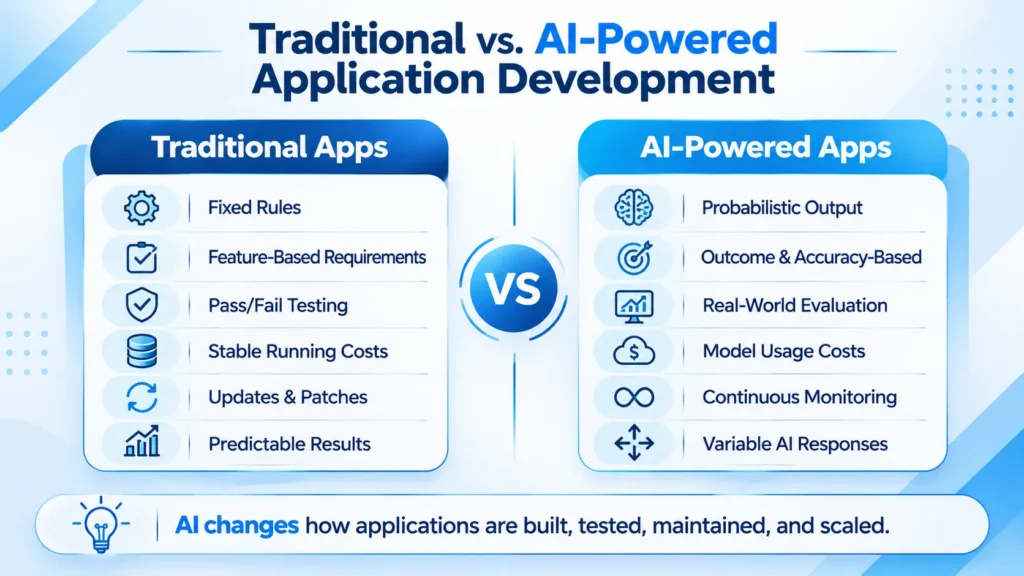
Traditional vs. AI-powered apps
The software behaves differently, so most parts of the project change with it.
| Area | Traditional app | AI-powered app |
|---|---|---|
| Behaviour | Fixed rules; same input, same output | Probabilistic; output can vary |
| Requirements | A list of features | Outcomes, plus how accurate is “good enough” |
| Data | Supports the app | Decides the quality of the result |
| Testing | Pass or fail | Scored against real examples |
| Main risk | Bugs | Confident, wrong answers |
| Running cost | Hosting and maintenance | Hosting, model usage, and monitoring |
| After launch | Patches and new features | Drift checks and tuning |
| Team | Developers, designers, QA | The same, plus data and AI specialists |
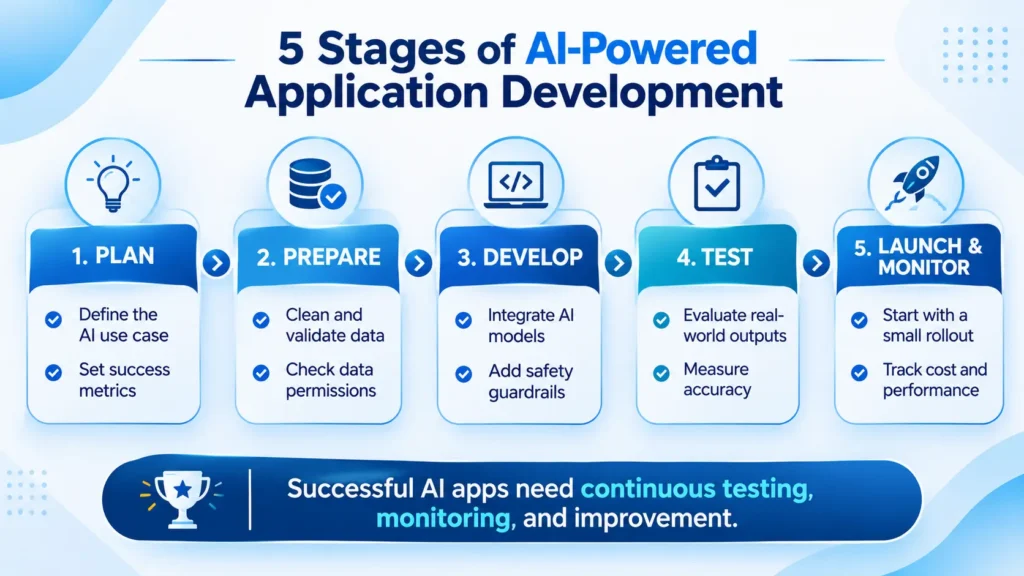
How AI changes each stage of the process
The classic stages still apply.
AI adds work to every one of them.
| Stage | What changes with AI |
|---|---|
| Discovery | Pick one specific task or decision for the AI to handle and write down how you will measure success. |
| Data readiness | Check that the data exists, is clean, and may be used for this purpose. This is often the slowest step. |
| Design | Show confidence levels, let people override the AI, and decide what happens when it is unsure. |
| Development | Normal engineering plus model or API integration. AI coding assistants can speed up the routine parts. |
| Testing | Score outputs against real examples before launch. A simple pass or fail test no longer covers it. |
| Deployment | Release to a small group first, with a fallback path if the AI fails. |
| Maintenance | Watch accuracy, cost, and drift. Results can decline with no code change, because models and data shift. |
Three ways to add AI to an app
There are three levels, from smallest to largest.
- An AI feature inside an ordinary app, such as search or ticket summaries. A failure affects one screen, so the risk is lowest.
- An agent that takes several actions across tools to finish a request. It needs approval steps and tighter guardrails.
- An AI-native product, where the model is the product. Data, evaluation, and monitoring become most of the workload.
A sensible order is to start with a feature and move up only when the results hold.
Where AI fits and where it does not
AI tends to fit when a wrong answer is cheap to catch, and a person can review it.
Good fits include:
- Drafting support replies for agents to approve
- Searching large sets of documents
- Extracting fields from invoices and forms
- Forecasting and recommendations
Poor fits include:
- Exact calculations such as billing
- Decisions that need guaranteed, auditable output
- Simple workflows that fixed rules already handle
Use AI for language and judgement calls.
Use plain code where the answer must be exact.
An example: AI in a support portal (illustrative)
Consider a support portal.
The traditional version routes tickets by keyword, and an agent writes each reply.
An AI version summarises each ticket, routes it by intent, and drafts a reply.
That small change adds work:
- Past tickets need cleaning and a check for personal details before any model sees them.
- To test the drafts, pull a few hundred past tickets, have two agents write the correct reply for each, and score the model against those answers.
- Agents review every draft at first.
- The rollout starts with a single product line.
- Every ticket now triggers a model call, so ticket volume shows up in the monthly bill.
Hidden mistakes that make AI projects fail
- Adding AI because a competitor did, then searching for a use for it. Write down the problem and the success measure first.
- Assuming the data is ready. Scattered, messy, or restricted data stalls projects, so audit it before design starts.
- Judging by the demo. A demo runs on hand-picked examples. Test on a broad sample of real cases instead.
- Shipping without a fallback. When the AI is wrong or unavailable, users need a human or a rule-based path.
- Ignoring running costs. Model charges often grow with usage, so estimate the monthly bill at your expected user numbers.
- Sending sensitive data to a model without a plan. Decide what the model may see and where it is processed.
- Treating launch as the end. Budget for monitoring and tuning from the first month.
What AI coding tools change
AI coding tools are good at first drafts, such as prototypes, repetitive code, and test cases.
They do not decide requirements or architecture.
A person still has to review what they produce for security.
Faster building brings its own risk: a team can reach the wrong product sooner.
Spend the time you save on planning and review before adding features.
What drives the cost of an AI app
- Data preparation: cleaning and organising data before a model can use it
- Model or API usage, which usually rises with the number of users
- Integration with your existing systems
- Security and compliance work in regulated sectors
- Ongoing monitoring of accuracy and spend
An AI app can be quick to prototype and still cost more to run than a traditional one.
Questions to answer before you start
- What specific task or decision should the app improve?
- What data will it use, and are you allowed to use it?
- How accurate must it be, and what happens when it is wrong?
- Who reviews the output, and when?
- What will it cost per month once real users arrive?
If you cannot answer these yet, settle them before you hire anyone.
How Prismberry can help
Prismberry builds custom web and mobile applications and adds AI where the use case supports it.
Its services include:
- AI solutions: chatbots, enterprise AI agents including its Agent IQ product, generative AI, and machine learning models
- Custom web and mobile development
- Cloud, DevOps, and QA
- Data analytics
- Managed services for support after launch
Planning an AI-powered app? Talk to the Prismberry team and get a clear plan for your project.
Conclusion
What is application development in 2026?
It is the same job as before, with three added responsibilities:
- Preparing data
- Measuring accuracy against real cases
- Watching cost and drift after launch
Write down your answers to the five questions above before you choose a vendor.
They give you a fair way to judge any proposal you receive.
Frequently asked questions
It is the process of creating software applications, such as mobile apps, web apps, or business tools, to solve specific problems for users or organisations.
Traditional apps follow fixed rules, while AI-powered apps produce probabilistic output. That changes how you test, budget, and maintain them.
AI tools can speed up coding and prototyping. Production apps still need people to decide requirements and architecture, and to review security and test results.