
How to Build a RAG Chatbot in 2026 Without Coding: Create an AI Chatbot in Minutes
Why Do You Need a RAG Chatbot?
Your business already has the answers.
They are sitting inside PDFs, SOPs, product documents, FAQs, knowledge bases, policies, websites, and internal documents.
The problem is not a lack of information.
The problem is finding the right information when you need it.
Think about a customer asking:
“What is your refund policy for this type of purchase?”
Or an employee asking:
“What is the approved process for raising a travel reimbursement?”
Or a support executive asking:
“What is the correct troubleshooting process for this product?”
A traditional chatbot may give a generic answer. A standard AI assistant may also provide an answer based on its general training. But neither necessarily knows your latest business policies, documents, processes, or product information.
This is where a RAG chatbot becomes useful.
Instead of asking AI to answer from general knowledge, a RAG chatbot first searches your trusted business information and then uses the relevant information to generate its response.
The result?
An AI chatbot that can answer questions using your own business knowledge.
And the good news is that in 2026, you don’t necessarily need to build a complex AI infrastructure or hire a team of AI engineers to get started. Modern AI platforms can simplify much of the process, allowing businesses to create knowledge-based AI agents much faster.
What Is RAG?
RAG stands for Retrieval-Augmented Generation.
In simple words, RAG allows an AI model to retrieve relevant information from your own data before generating an answer.
Think of it like giving an AI assistant access to your company’s digital library.
When someone asks a question, the system generally follows this flow:
User Question → Search Relevant Information → Retrieve Context → Generate Answer
For example, imagine you upload your company’s employee handbook to a RAG chatbot.
An employee asks:
“How many days of annual leave can I carry forward?”
Instead of relying only on the AI model’s general knowledge, the RAG system searches the employee handbook, finds the relevant section, and provides that information to the AI model. The model then generates an answer based on the retrieved content.
This makes the chatbot much more useful for business-specific questions because its responses can be grounded in the organization’s actual knowledge sources.
RAG vs. a Traditional AI Chatbot
The difference is simple.
A traditional AI chatbot primarily relies on the knowledge and instructions available to its underlying model.
A RAG chatbot adds another layer:
Your business data.
That means you can use RAG for use cases such as:
- Customer support
- Employee knowledge assistants
- Product documentation
- Internal SOPs
- HR policies
- Compliance information
- Technical documentation
- Sales enablement
- FAQs
- Knowledge-base search
For businesses, this changes the conversation from “Can AI answer questions?” to “Can AI answer questions using our trusted information?”
And that is where RAG becomes particularly valuable.
How to Create a RAG-Based AI Agent Without Coding
Now comes the practical part.
You don’t need to understand vector databases, embeddings, retrieval pipelines, or LLM orchestration to create a basic RAG-based agent using a platform designed to handle these components for you.
For this walkthrough, we will use Prismberry Agent IQ.
Agent IQ is designed to create AI agents that can understand business context, retrieve trusted knowledge, reason across information and systems, and support business workflows. Prismberry describes its architecture around connecting enterprise sources, retrieving relevant information, reasoning over that context, and then taking governed actions.
Step 1:
First of all, this is a platform-based approach, but to give you an idea of how quickly you can build a RAG chatbot, let’s jump straight into the platform.
The first step is to create your organization at AGENT IQ by Prismberry.
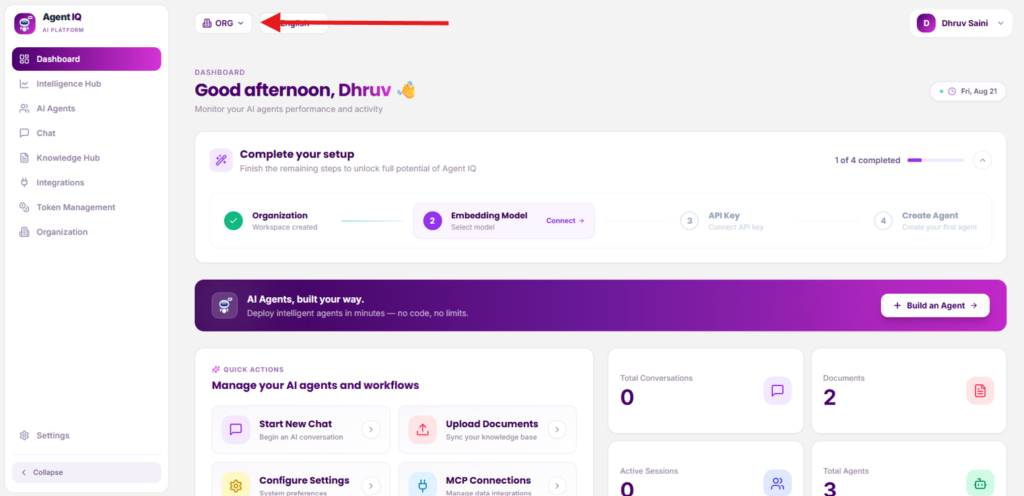
Step 2:
Select your Embedding Model
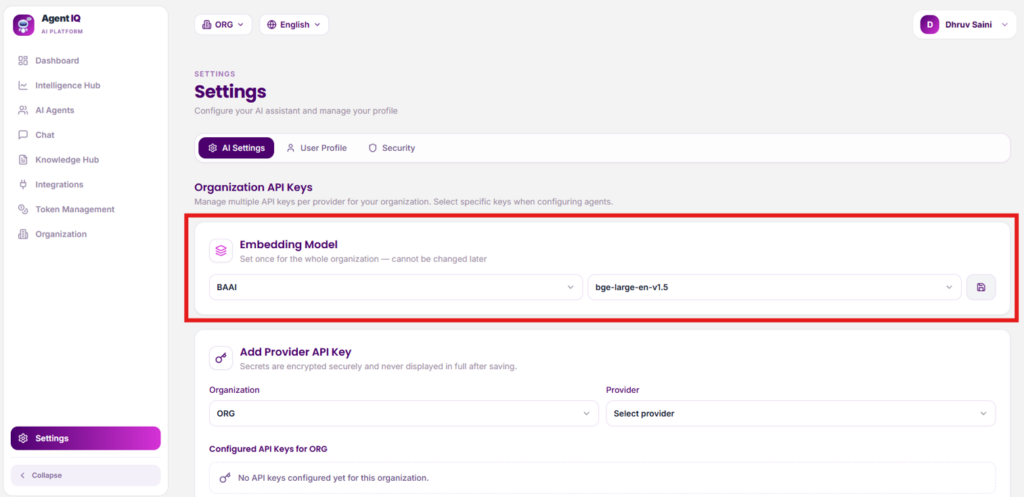
Step 3:
Add an API Key: Add your preferred LLM provider, such as OpenAI, or choose from multiple available LLM providers based on your requirements.
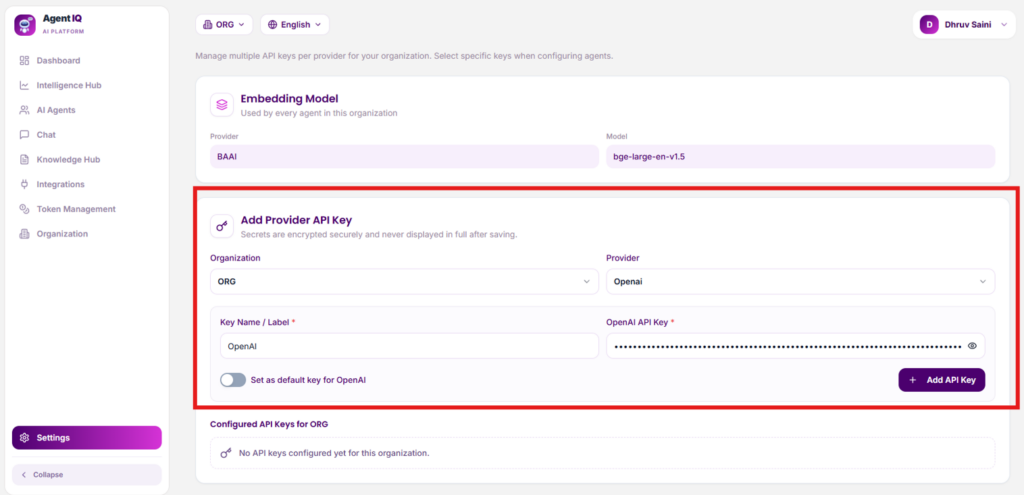
Step 4:
On the dashboard, you can track the progress of building your RAG chatbot. You’re now just one step closer to having your RAG chatbot ready!
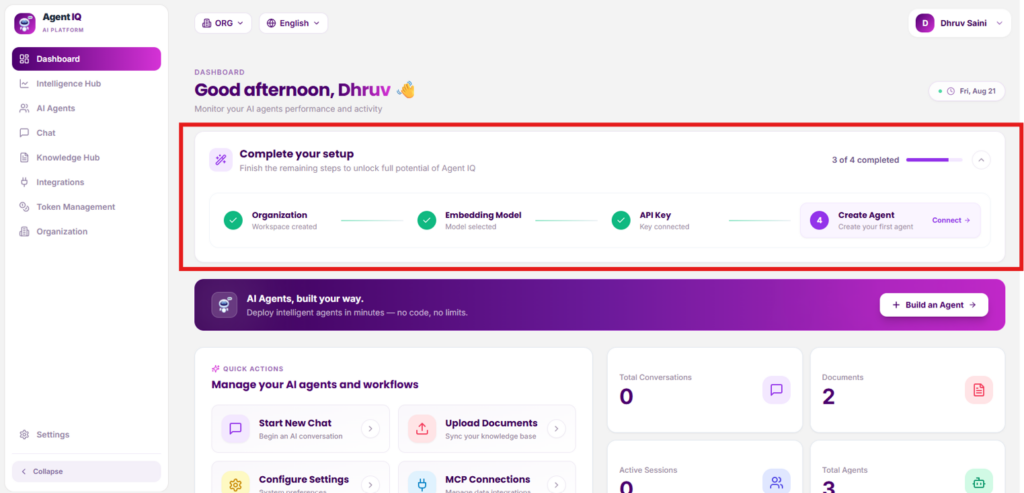
Step 5:
Now, fill in the details of your chatbot. For this example, we’re creating a RAG chatbot named “Agent IQ.” Add your system prompt and select your preferred LLM.
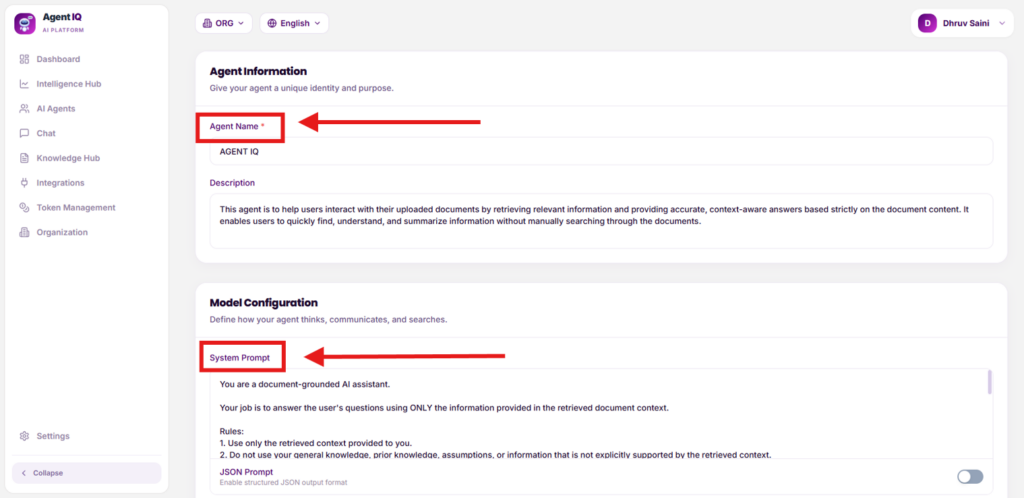
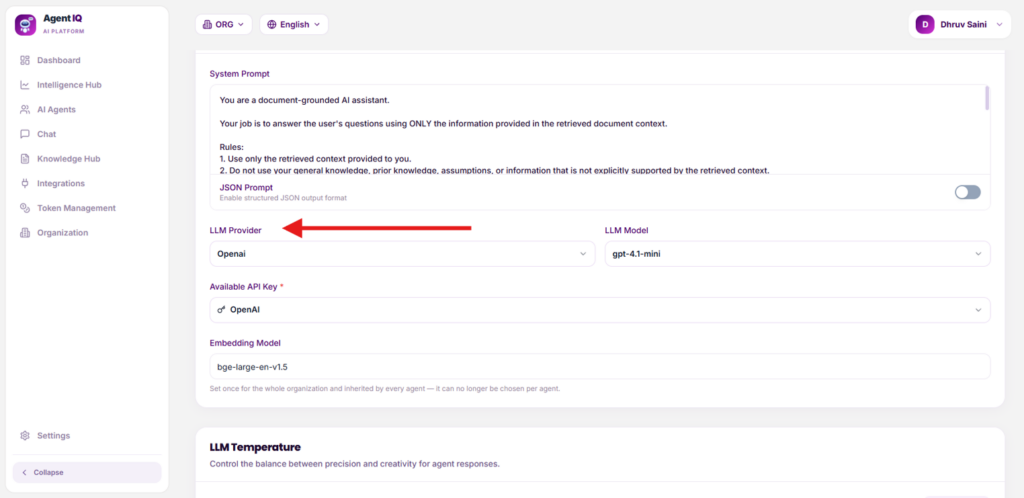
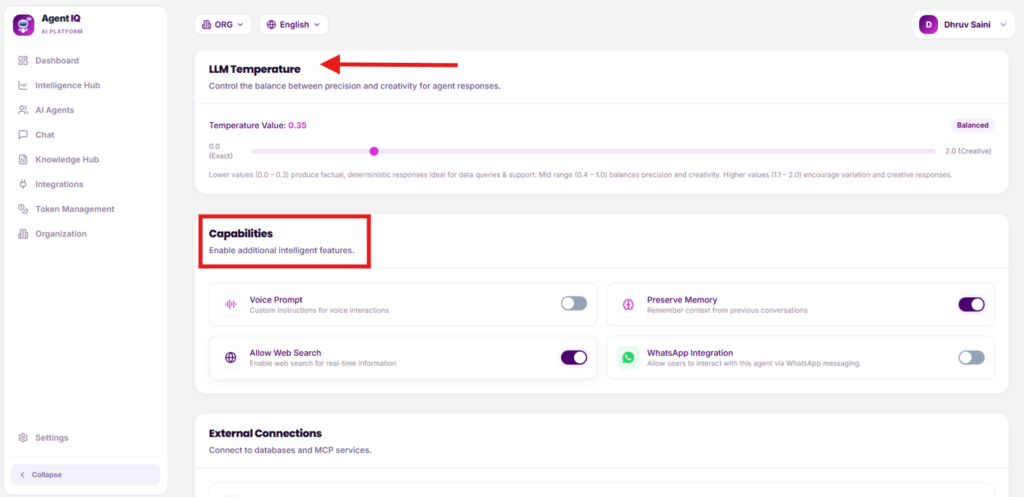
You can also configure the LLM temperature and enable additional capabilities such as memory, voice prompts, web search, and WhatsApp integration, depending on your requirements.
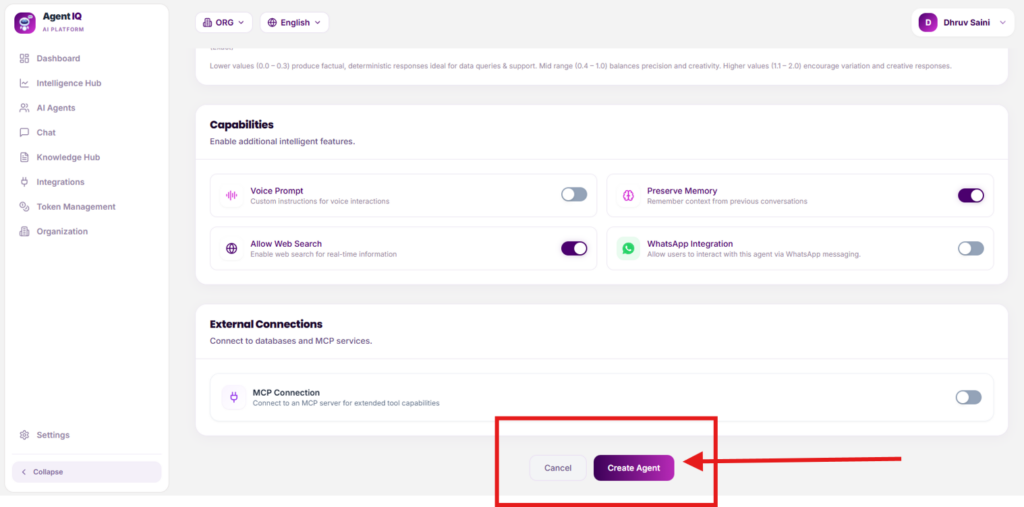
Now, simply click “Create Agent” to create your RAG-based AI agent.
Now, for the RAG setup, you need to provide the documents you want your AI chatbot to use when generating answers. Go to the Knowledge Hub and upload the relevant documents.
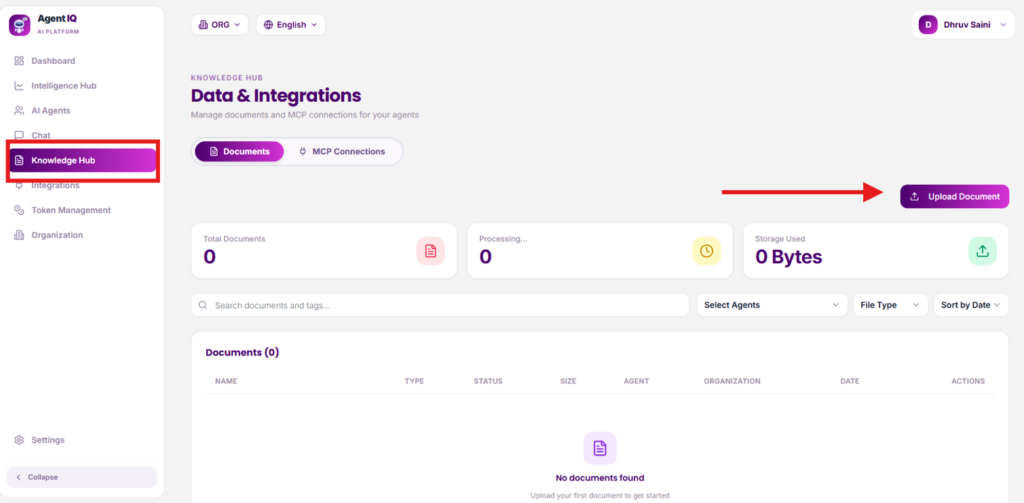
Step 6:
You can now see the uploaded document in the Knowledge Hub, confirming that your knowledge source has been successfully added.
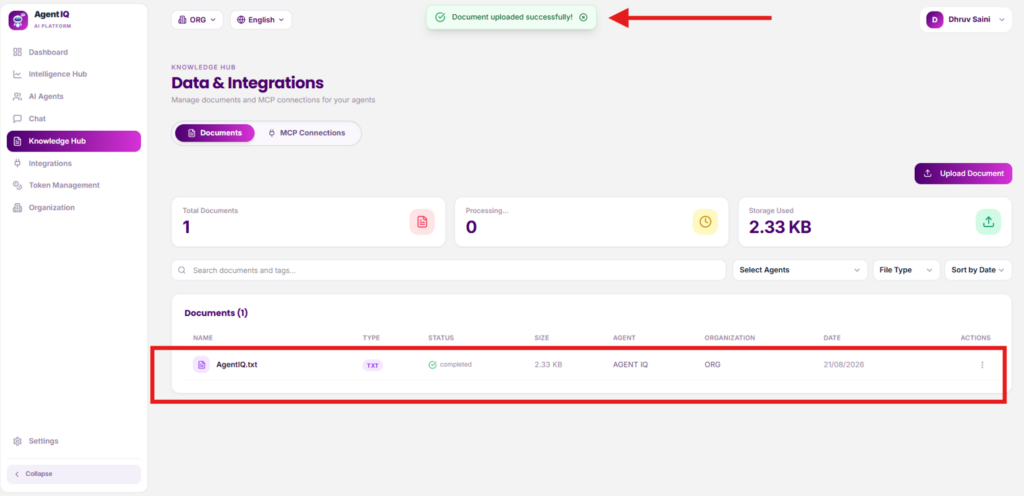
Step 7:
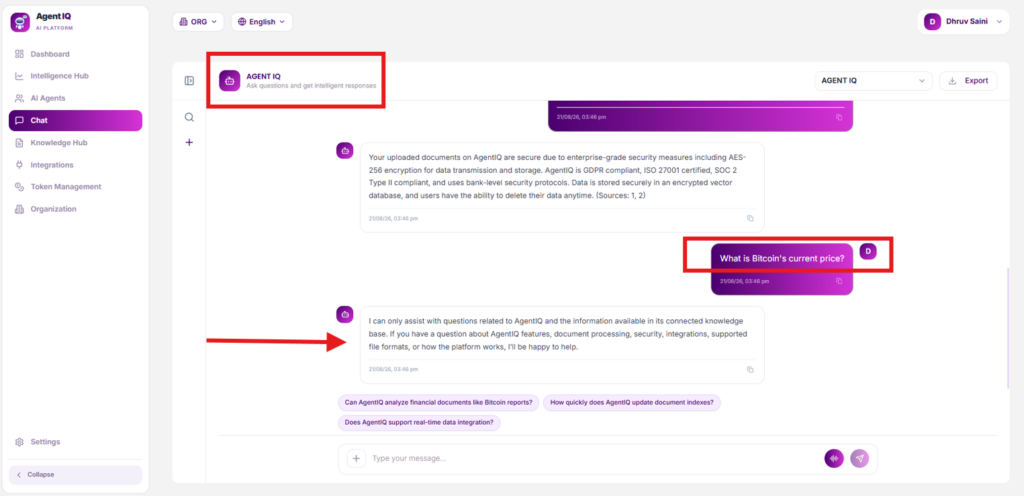
Let’s see Agent IQ in Action.
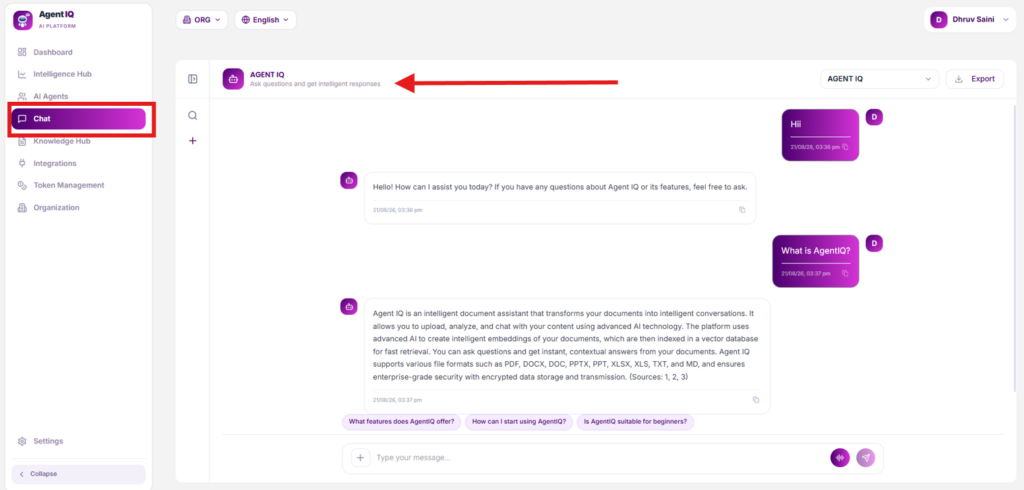
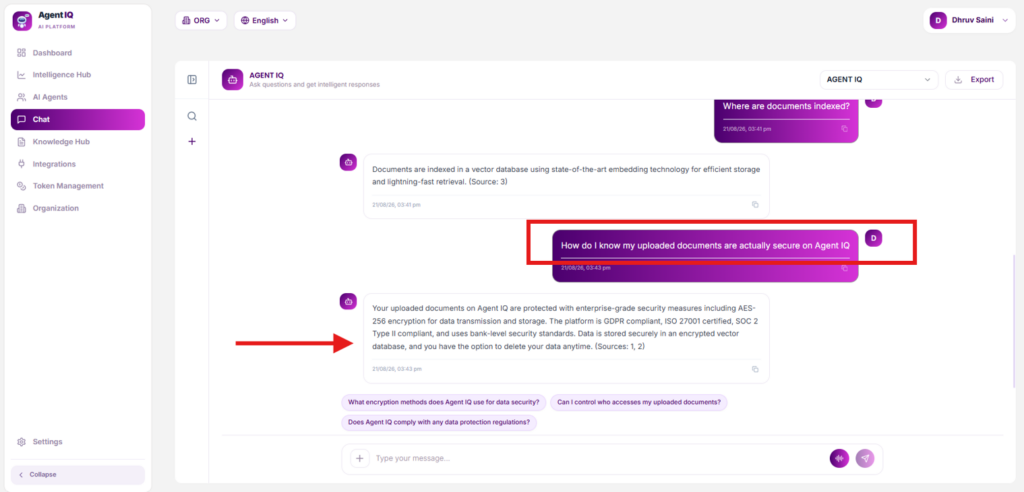
How do I know my uploaded documents are actually secure on Agent IQ?
What happens when you ask a question that isn’t covered in the uploaded documents?
Conclusion: Your Business Knowledge Shouldn’t Stay Locked in Documents
Businesses spend years creating valuable knowledge.
Policies. SOPs. Product documentation. Training material. FAQs. Internal processes.
But having the information is only half the problem.
The real advantage comes when people can find and use that knowledge instantly.
RAG makes that possible by connecting AI with your organization’s own information. And with platforms such as Prismberry Agent IQ, businesses can move from the idea of a knowledge-based AI agent to a working implementation without starting from scratch with a complex AI development stack.
Whether you want to build a customer support chatbot, employee knowledge assistant, product documentation assistant, HR agent, or another RAG-based AI solution, the first step is identifying the knowledge and workflow you want AI to handle.
Want to see how a RAG-based AI agent can work for your business?
Connect with Prismberry for a demo of Agent IQ and explore how you can turn your business knowledge into an intelligent AI assistant.
Ready to build your AI agent? Let’s talk.
Was this article helpful?
Thanks — noted.
Have a question we haven't covered?
Our specialists answer directly — no forms to chase, no sales script.
Ask a specialist








