
Introduction
Most enterprise software today was built for a world before AI. It relies on rigid rules, predetermined workflows, and manual inputs. AI native applications are fundamentally different they are designed from the ground up with artificial intelligence as the core operating layer, not as a bolt-on feature.
Yet most companies that attempt to build AI native applications stumble at the same points: they pick the wrong architecture, skip foundational data work, or push to production without a plan for monitoring and iteration. The result is expensive, underperforming software that erodes trust in AI investment.
This guide outlines 7 proven steps to build AI native applications successfully covering everything from AI native architecture and AI native software development to platform selection, deployment, and ongoing optimization.
What Are AI Native Applications?
AI native applications are software systems where artificial intelligence is not an added feature — it is the foundational architecture. Every layer of the application, from data management to user interface, is designed to leverage machine learning, generative AI, and adaptive algorithms from day one.
This is fundamentally different from AI-enabled applications, where AI is layered onto an existing traditional platform as an enhancement.
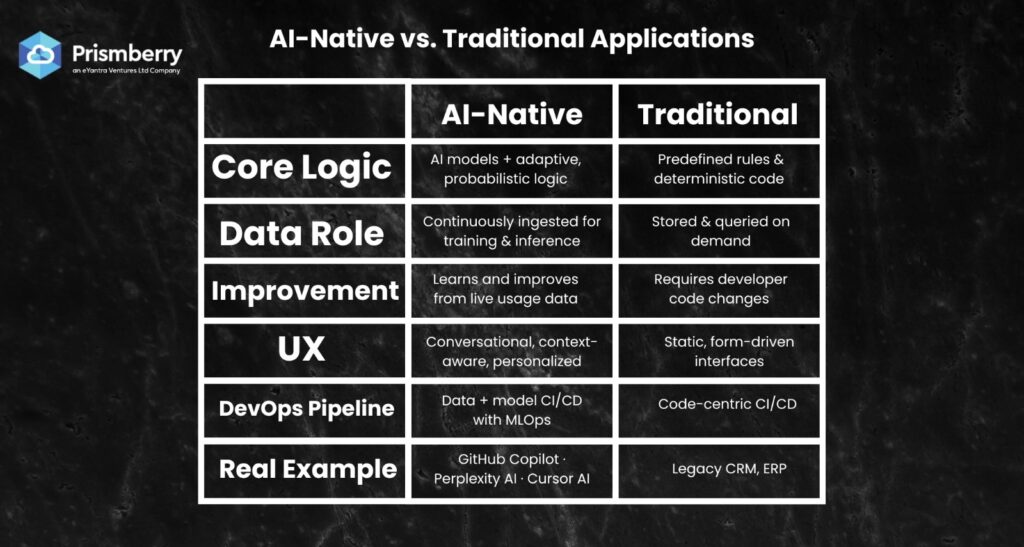
| Dimension | Traditional Platforms | AI Native Platforms |
| Core Logic | Predefined rules & deterministic code | AI models, probabilistic reasoning, adaptive logic |
| Data Role | Stored and queried on demand | Continuously ingested for training & real-time inference |
| Improvement | Requires developer code changes | Learns and improves from live usage data |
| UX | Static, form-driven interfaces | Conversational, context-aware, personalized |
| DevOps Pipeline | Code-centric CI/CD | Data + model-centric CI/CD with MLOps |
| Example | Traditional CRM, ERP | Salesforce Einstein, GitHub Copilot, Cursor AI |
AI Native Application Examples
Understanding what AI native looks like in production helps clarify what you’re building toward:
- GitHub Copilot: AI is the product itself, code suggestions, test generation, and PR reviews powered by LLMs, not rule-based autocomplete.
- Cursor AI: An AI-first IDE where the entire codebase is AI-indexed, enabling contextual multi-file edits and autonomous agent workflows.
- Perplexity AI: A search engine built entirely around LLM reasoning, not keyword matching — AI native SaaS platform by design.
- Deel: HR platform that uses AI-native architecture to automate global payroll, compliance detection, and contract generation in real time.
- Abridge: AI native healthcare app that transcribes and summarizes doctor-patient conversations — AI is not a feature, it is the core workflow.
7 Steps to Build AI Native Applications Successfully
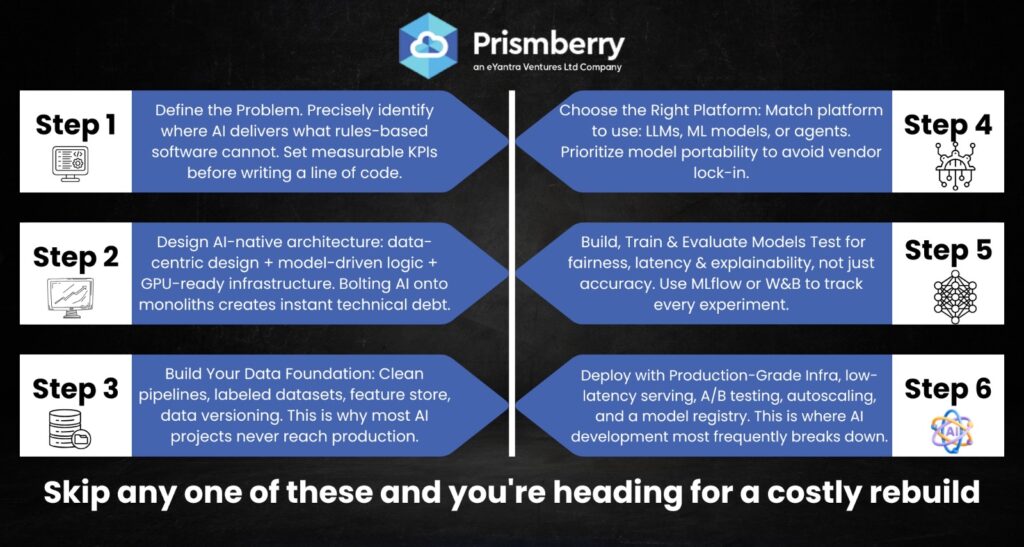
1. Define the Problem & AI Use Case Precisely
Start by identifying a specific, high-value problem where AI delivers outcomes that rule-based software cannot — personalization, real-time prediction, natural language understanding, or anomaly detection. Enterprises that fail here build “AI for the sake of AI,” investing in solutions that never align with core KPIs. Define measurable success metrics before writing a line of code.
2. Design an AI Native Architecture from Day One
AI native architecture differs fundamentally from traditional software architecture. You need a data-centric design (continuous ingestion, not batch ETL), model-driven logic at the application layer, adaptive infrastructure (GPU/TPU-ready, auto-scaling), and a data + model CI/CD pipeline instead of code-only CI/CD. Bolting AI onto an existing monolithic architecture is the fastest path to technical debt.
3. Build Your Data Foundation
AI is only as good as its data. This step involves: establishing data collection pipelines aligned to your AI use case, cleaning and labeling training datasets, implementing a feature store for consistent real-time and batch feature computation, and setting up data versioning (DVC, Delta Lake) for reproducibility. Skipping this step is why most enterprise AI projects fail to reach production.
4. Select the Right AI Native Development Platform
Choose platforms built for AI-first workflows, not general-purpose tools retrofitted for AI. Evaluate against your use case: LLM apps (LangChain, LlamaIndex, AWS Bedrock), ML models (Google Vertex AI, Azure ML, Databricks), agent development (AutoGen, CrewAI, LangGraph), and AI native cloud platforms (CoreWeave, together.ai). Vendor lock-in risk and model portability should be top selection criteria.
5. Build, Train & Evaluate Your AI Models
Develop and train models using ML frameworks (PyTorch, TensorFlow) or fine-tune foundation models (GPT-4, Llama 3, Mistral) on your domain-specific data. Critically — evaluate models not just for accuracy, but for fairness, latency, robustness, and explainability. Use experiment tracking tools (MLflow, Weights & Biases) to manage this phase. Models that pass internal benchmarks but fail on real-world edge cases are a production liability.
6. Deploy with Production-Grade Serving Infrastructure
This is where AI native software development most frequently breaks down. Production deployment requires: low-latency inference serving (Triton, vLLM, TorchServe), API gateway management, A/B testing and canary deployments for model rollouts, autoscaling to handle traffic spikes, and a model registry for versioning and rollback. For AI native SaaS platforms, multi-tenant serving with isolated model contexts is an additional requirement.
7. Monitor, Detect Drift & Continuously Improve
AI native applications are never “done.” Unlike traditional software, AI models degrade over time as real-world data distributions shift. You need: real-time model performance monitoring (Arize AI, WhyLabs, Fiddler AI), automated data drift and concept drift detection, continuous retraining pipelines triggered by performance degradation, and user feedback loops to refine model behavior. This continuous learning loop is what separates a production AI native app from a one-time ML project.
AI Native Development Platforms: Quick Comparison
| Platform | Best For | Deployment Model | Key Strength |
| AWS Bedrock | Enterprise LLM apps, RAG pipelines | Cloud (AWS) | Broadest model catalog, secure VPC deployment |
| Google Vertex AI | End-to-end ML + Gen AI | Cloud (GCP) | TPU access, tight BigQuery integration |
| Azure AI Foundry | Enterprise AI apps + agents | Cloud / Hybrid | Deepest Microsoft ecosystem integration |
| Databricks | Data + ML unified pipelines | Multi-cloud | MLflow native, Delta Lake, Unity Catalog |
| LangChain / LangGraph | LLM app & agent development | Self-hosted / Cloud | Most flexible open-source LLM orchestration |
| Hugging Face | Model fine-tuning & deployment | Cloud / Self-hosted | Largest open-source model hub |
Why Choose Prismberry for AI Native Application Development?
At Prismberry, we are an enterprise AI platform development company that helps organizations move from AI ideas to production-grade, scalable AI native applications — without the wrong architecture decisions or costly rebuilds.
- AI Native Architecture Design – We design data-centric, model-driven architectures from day one — not retrofitted AI on legacy systems.
- Full-Stack AI Development – From LLM fine-tuning and RAG pipelines to inference APIs and adaptive UI — we cover every layer.
- Platform-Agnostic Approach – We work across AWS Bedrock, Vertex AI, Azure AI, LangChain, and open-source stacks — no vendor lock-in.
- Enterprise-Ready Delivery – Every application includes security, RBAC, audit logging, and compliance from day one — built for scale.
- AI Platform Consulting – From platform selection and architecture reviews to team enablement and ongoing optimization programs.
- Post-Launch MLOps Support – We set up continuous monitoring, drift detection, and retraining pipelines so your AI stays accurate in production.
Conclusion
Building AI native applications successfully is not about finding the best model — it is about getting every layer of the stack right: architecture, data, platform selection, deployment, and continuous improvement. The companies winning with AI in 2026 are those treating AI native development as a disciplined engineering practice, not a one-time project.
Whether you are evaluating AI native development platforms, planning enterprise AI native platform development, or seeking AI platform consulting services to build AI native applications for your business — the seven-step process in this guide provides the structured foundation your team needs.
Frequently Asked Questions (FAQs)
A: AI native applications are software systems that integrate artificial intelligence into their core architecture, utilizing machine learning and adaptive algorithms throughout. Examples include GitHub Copilot, Perplexity AI, and Abridge.
A: AI-enabled platforms enhance traditional software with AI features (like Microsoft Copilot), while AI-native platforms are built around AI, offering continuous learning, model-driven workflows, and adaptive user experiences that AI-enabled systems lack.
A: AI native architecture emphasizes continuous data ingestion, model-driven logic, and adaptive infrastructure, such as GPU/TPU readiness and auto-scaling. It transitions from rule-based logic to probabilistic learning systems.
A: The best platform depends on the use case: AWS Bedrock and Azure AI Foundry suit secure enterprise apps; Google Vertex AI excels in ML and Gen AI with TPU access; Databricks is ideal for data-heavy ML pipelines; and for custom LLM app development, use LangChain or LangGraph.
A: An MVP for a single AI use case typically takes 3–6 months, while a full enterprise AI platform can take 9–18 months. Using managed AI cloud platforms like AWS Bedrock or Vertex AI can accelerate time-to-production compared to custom ML infrastructure.
A: The five common failure points are: (1) unclear use cases misaligning investments, (2) weak data foundations harming model performance, (3) poor AI architecture choice, (4) inadequate infrastructure causing latency, and (5) lack of post-deployment monitoring resulting in model drift.